VoiceCal Scheduler, for Google Calendar
How-to · Google Calendar
How to move or cancel a Google Calendar event by voice
Say which event and what should change: "Move my 2:00 meeting on Thursday to 3:30pm" or "Cancel my 10am meeting on Friday". VoiceCal™ finds the event on your Google Calendar, shows you the old time and the new one, and changes nothing until you confirm. AI handles the details, and nothing is saved until you check it.
Steps
Step 1: Open VoiceCal and tap the microphone.
Or type in the box that reads "Say it or type it". Typing works the same way.
Step 2: Say the event and the change.
Name it by its time, its title or both: "Move my budget review to Friday at 10", "Cancel my 10am meeting on Friday".
Step 3: Check the card.
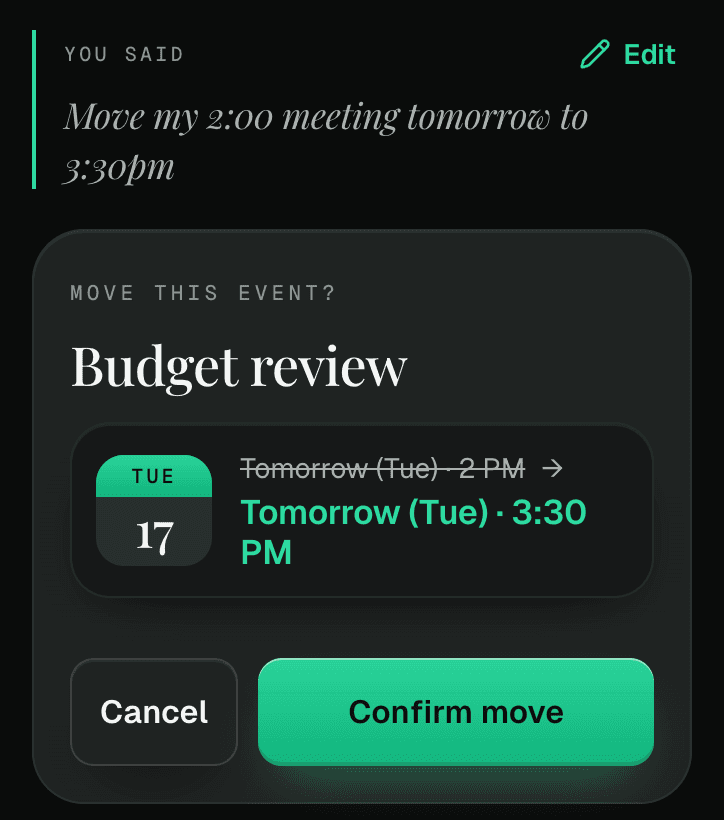
"Move this event?" shows the old time crossed out and the new time. "Delete this event?" shows the event you named.
Step 4: Confirm.
Tap "Confirm move", or press and hold "Hold to delete". If the event has guests, VoiceCal asks whether to tell them: "Notify guests" or "Don't notify".
If more than one event matches
VoiceCal lists them and asks "Which one should I move?" or "Which one should I delete?". Tap the right one.
Repeating events
Moving or cancelling one date of a repeating event changes only that date, never the whole series.
Changed your mind?
After a move or a delete, an "Undo" button shows for a short time. A deleted event that had guests, or one date of a repeating event, can't be undone.
Things you can say
- "Move my 2:00 meeting on Thursday to 3:30pm"
- "Move lunch with Sam to next Tuesday"
- "Cancel my 10am meeting on Friday"
- "Add april@example.com to my 2pm"
Questions
Can I move a Google Calendar event without opening Google Calendar?
Yes. Say or type the change in VoiceCal, check the card and confirm. The event moves on your Google Calendar.
Will my guests be told?
You choose. When an event has guests, VoiceCal asks "Notify guests" or "Don't notify".
Does it work on a computer?
Yes. VoiceCal runs in the browser on a phone or a computer, and typing works everywhere.
Does it cost anything?
It's free during early access. When paid plans start on January 1, 2027, the Free plan keeps 50 smart actions a month.